
Rating your mentor and check-ins
Rate your mentor and read the check-ins they write about you.
What this page is for
Two cards on Your week are about your mentor. In one you rate your mentor once a week. The other lists the ratings your mentor has given your recent weeks. Neither card shows the notes your mentor writes in their check-ins; you see only the date and the rating.
- Where
- Cards on Your week, below this week's assignments (address /)
- Who can open it
- Interns, while their enrollment is active
- App
- Intern Portal
How a weekly rating works
The same steps as a list
- Open Your week and find the rating card
- Tap a number from 1 to 5 and add a comment if you like
- Press Save rating
- Do you have an assigned mentor? (Yes: Shows Mentor rating submitted until next Monday; No: a message says to check back: Tap a number from 1 to 5 and add a comment if you like)
- Shows Mentor rating submitted until next Monday
The screen
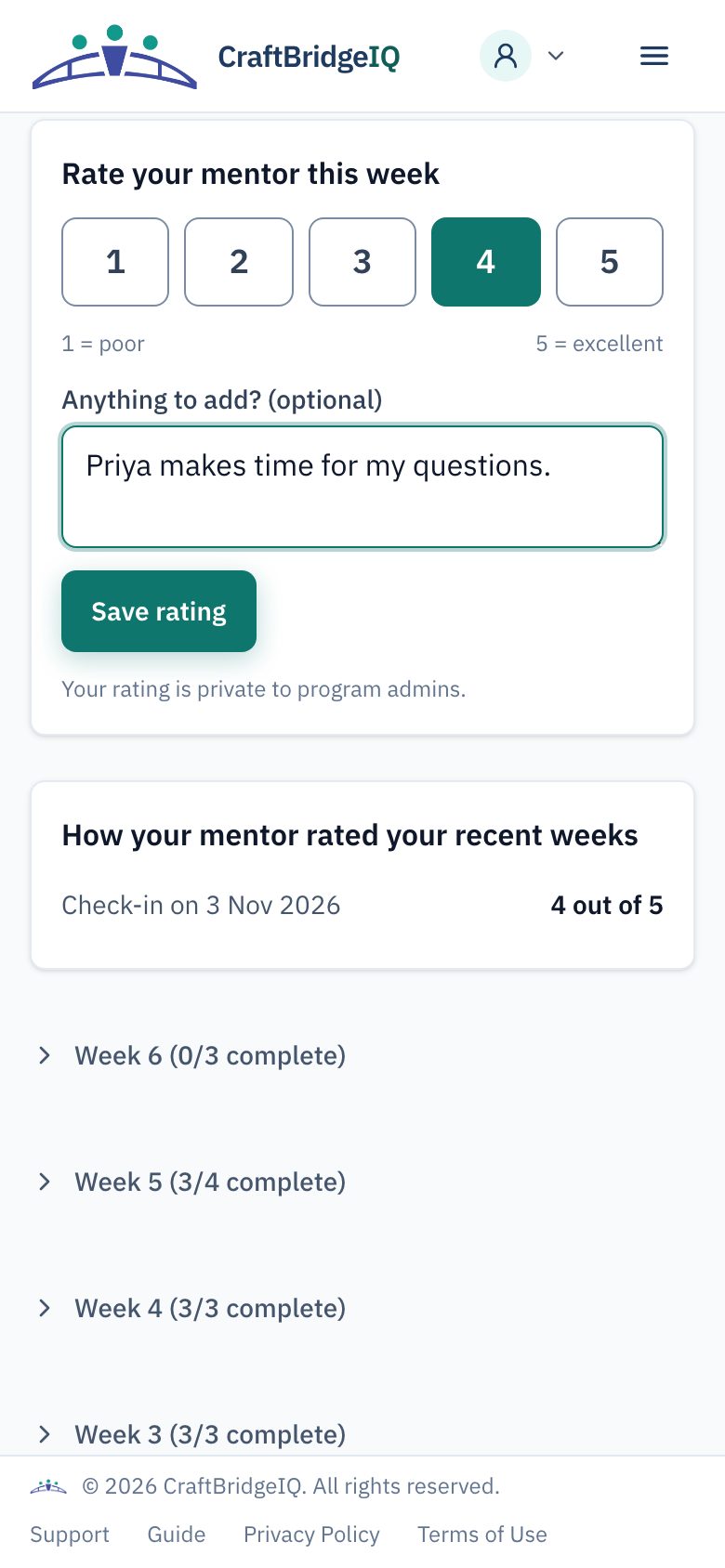
| No. | Control | What it does | What happens next |
|---|---|---|---|
| 1 | Rate your mentor this week | The heading of the rating card. It is shown while your enrollment is active. | Nothing; it is a heading. |
| 2 | Rate 1 out of 5 | Five large buttons, 1 to 5. A screen reader announces each as Rate N out of 5. Tap one to choose it; the chosen button fills in. | Save rating turns on. |
| 3 | 1 = poor | A reminder of the scale. The right end reads 5 = excellent. | Nothing; it is a label. |
| 4 | Anything to add? (optional) | A box for a short comment about the week. | Saved with your rating. |
| 5 | Save rating | Saves your rating. It stays dimmed until you choose a number. | The card changes to Mentor rating submitted. |
| 6 | Your rating is private to program admins. | Tells you who can read your rating. | Nothing; it is a note. Your mentor cannot read individual ratings. |
| 7 | How your mentor rated your recent weeks | Appears once your mentor has rated at least one of your weeks. | Nothing; it is a list. |
| 8 | Check-in on 3 Nov 2026 | The date of a check-in that carries a rating. | Nothing; it is a label. |
| 9 | 4 out of 5 | The rating your mentor gave that week. | Nothing; it is a label. |
After you save, the form is replaced by a short summary until the next week begins.
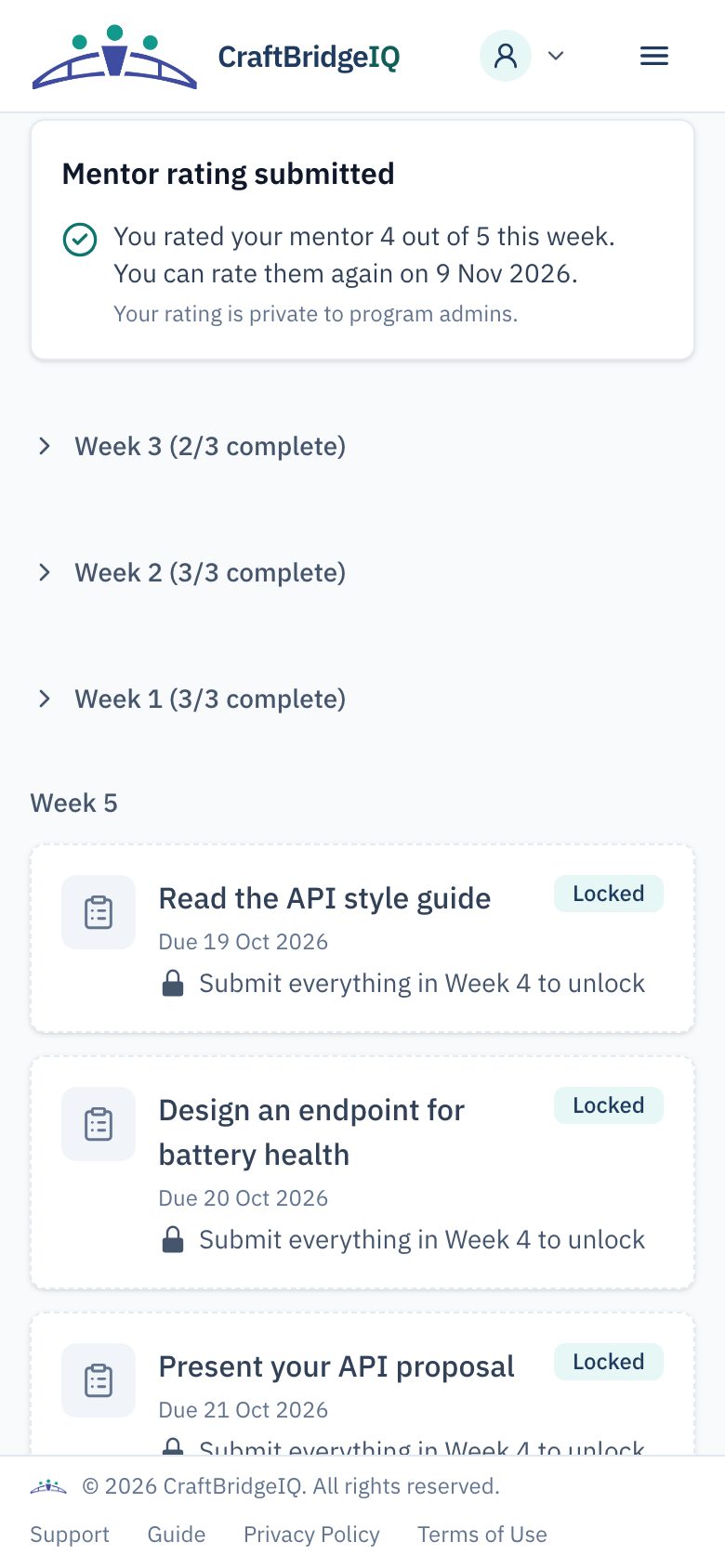
| No. | Control | What it does | What happens next |
|---|---|---|---|
| 10 | Mentor rating submitted | The heading once this week's rating is saved. | Nothing; it is a heading. |
| 11 | You rated your mentor 4 out of 5 this week. | Repeats your rating and says when you can rate again, which is the Monday that starts next week. | On that Monday the form comes back. |
Step by step
Rate your mentor
- Open Your week and scroll to Rate your mentor this week.
- Tap a number from 1 to 5. Tap another to change your mind before you save.
- Type a comment in Anything to add? (optional) if you want to.
- Press Save rating.
A message tells you the rating is private to program admins, and the card changes to Mentor rating submitted.
Read the ratings you received
- Scroll to How your mentor rated your recent weeks.
- Read each line: the date of the check-in and the rating out of 5.
The rating form
| Field | Required | Rules | Example |
|---|---|---|---|
| Rate 1 out of 5 | Yes | One whole number from 1 (poor) to 5 (excellent). | 4 |
| Anything to add? (optional) | No | Up to 1,000 characters. | Priya makes time for my questions. |
Messages you can see
| Message | When you see it | What to do |
|---|---|---|
| your rating is private to program admins | A toast after Save rating works. It begins with Thanks. | Nothing. |
| Saving… | On the button while your rating is being saved. | Wait. |
| You can rate your mentor once one is assigned to you. Check back soon. | You press Save rating but have no active mentor. | Ask your program admin about your mentor, then try again later. |
| Couldn't save your rating | A toast, when saving failed for another reason. It ends with try again. | Press Save rating again. |
| Couldn't load your rating. | The card could not load. A Try again button is shown with it. | Press Try again. |
Limits and other roles
- You can rate your mentor once a week. A week runs from Monday to Sunday, and the form comes back on the next Monday.
- The comment can be up to 1,000 characters.
Common questions
Why does the card say Mentor rating submitted?
You have already rated this week. The form returns on the Monday shown in the card.
Who can read my rating?
Program admins. Your mentor cannot read individual ratings.
Why is there no card with ratings from my mentor?
It appears only after your mentor has rated a week. Until then there is nothing to show.
Can I read my mentor's check-in notes?
No. This card shows the date and the rating only.
Last checked 2026-11-03 against the product.