
Assigning mentors
Match mentors to interns.
What this page is for
Use Assign mentors to match each intern with a mentor. The page lists every active intern across all your programs with their current primary mentor, and it opens on the interns who still have none. For each intern you can assign a mentor, change the mentor, or end the mentorship.
When you choose a mentor you see a ranked list of your mentors, each with a short reason, so you can see why one is suggested before another.
- Where
- People menu, then Mentors, then Assign mentors (address /assign-mentors)
- Who can open it
- Administrators can assign, change and end. A support login can read the list.
- App
- Program Studio
How assigning a mentor works
The same steps as a list
- Open Assign mentors, which opens on Unassigned
- Press Assign on an intern
- Lists your mentors, best match first, each with a reason
- Press Assign next to the mentor you want
- Is that mentor accepting and not full? (Yes: The mentor is set and the intern leaves the unassigned list; No: the button is switched off: Press Assign next to the mentor you want)
- The mentor is set and the intern leaves the unassigned list
The screen
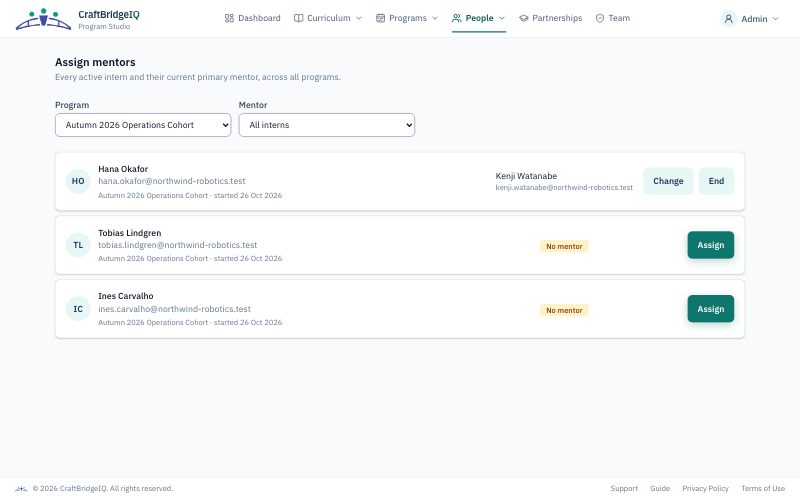
| No. | Control | What it does | What happens next |
|---|---|---|---|
| 1 | Assign mentors | The page heading. | Nothing; it is a label. |
| 2 | Every active intern and their current primary mentor, across all programs. | Says what the list holds. | Nothing; it is a label. |
| 3 | Program | Shows interns of one program, or All programs. | The list reloads for that program. |
| 4 | Mentor | Chooses Unassigned, Assigned or All interns. | The list reloads. The page opens on Unassigned. |
| 5 | Intern name and email | Each intern's initials, name and email address. | Nothing; it is a label. |
| 6 | Autumn 2026 Operations Cohort · started 26 Oct 2026 | The program the intern is on and the date their enrollment started. | Nothing; it is a label. |
| 7 | Current mentor | The intern's current primary mentor, with their email. | Nothing; it is a label. |
| 8 | Change | Shown when the intern has a mentor. Opens the Change mentor box. | You pick a new mentor and the old one is replaced in one step. |
| 9 | End | Shown when the intern has a mentor. Opens the End mentorship box. | You confirm and the intern becomes unassigned. |
| 10 | No mentor | A yellow label on an intern without a current primary mentor. | Press Assign. |
| 11 | Assign | Shown when the intern has no mentor. Opens the Assign a mentor box. | A ranked list of mentors appears. |
Press Assign and a box lists your mentors, best match first:
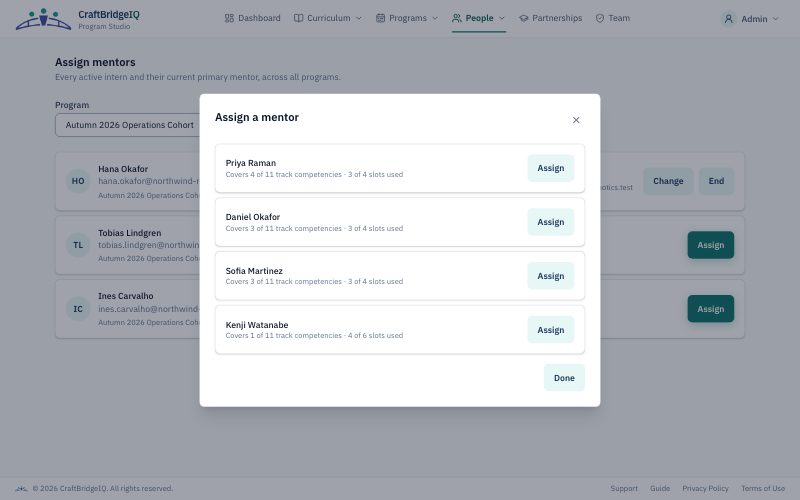
| No. | Control | What it does | What happens next |
|---|---|---|---|
| 1 | Assign a mentor | The title of the box. | Nothing; it is a label. |
| 2 | Covers 4 of 11 track competencies · 3 of 4 slots used | The reason this mentor is ranked here: how many of the program's competencies they can teach, and how many of their intern slots are in use. | Nothing; it is a label. |
| 3 | Assign | Makes this mentor the intern's primary mentor. Switched off for a mentor who is full or not accepting new interns. | The box closes and a confirmation appears. |
| 4 | Done | Closes the box without choosing. | You are back on the list. |
| No. | Control | What it does | What happens next |
|---|---|---|---|
| Close | The X in the corner of every box. Same as Done. | You are back on the list. |
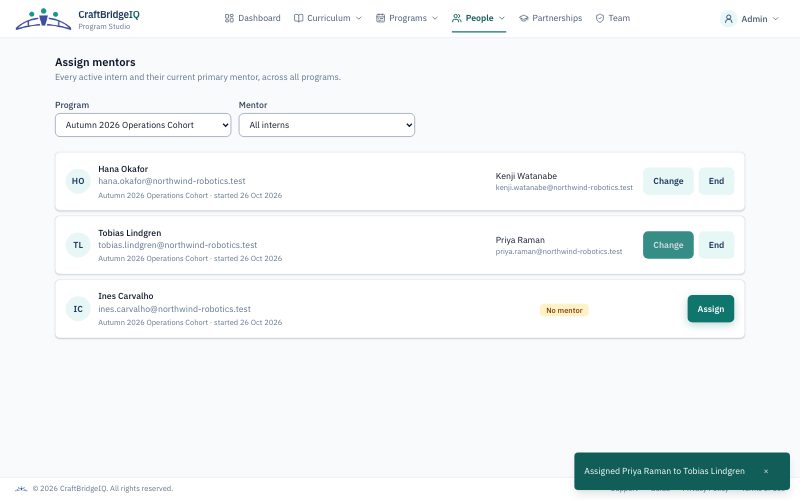
After you press Assign a confirmation appears at the bottom of the screen, and the intern now shows the mentor:
Press Change on an intern with a mentor:
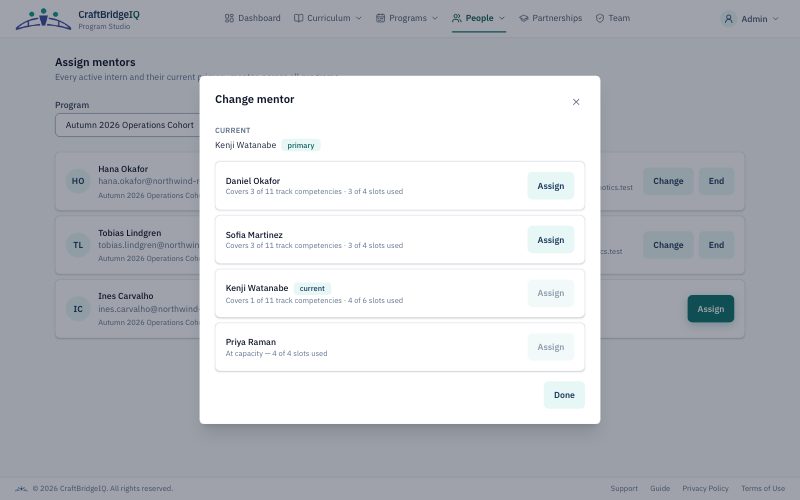
| No. | Control | What it does | What happens next |
|---|---|---|---|
| 1 | Change mentor | The title of the box. | Nothing; it is a label. |
| 2 | Current | The intern's current mentor, with a primary label. | Nothing; it is a label. |
| 3 | current | Marks the current mentor in the ranked list. Their Assign button is switched off. | Choose a different mentor. |
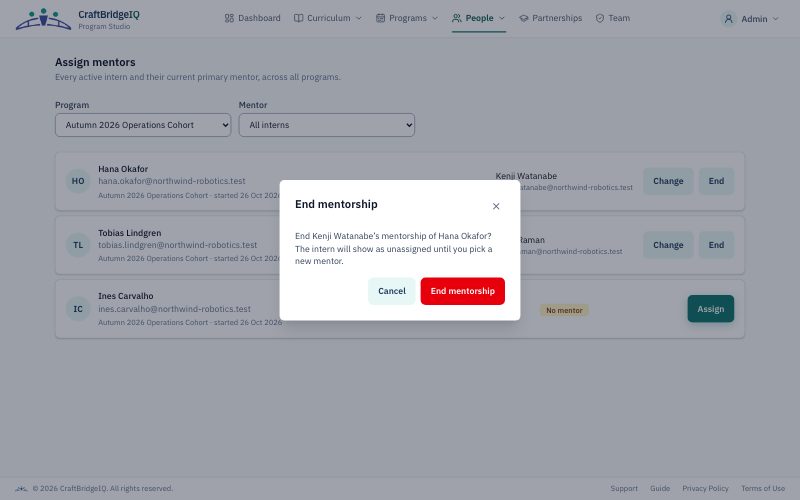
Press End on an intern with a mentor:
| No. | Control | What it does | What happens next |
|---|---|---|---|
| 1 | End mentorship | The title of the box, and the red button that confirms. | Nothing; it is a label. |
| 2 | The intern will show as unassigned until you pick a new mentor. | Names the mentor and the intern and says what ending does. | Nothing; it is a label. |
| 3 | Cancel | Closes the box and changes nothing. | You are back on the list. |
| 4 | End mentorship | Confirms. The button reads Ending… while it works. | The mentorship ends and the intern shows No mentor. |
Step by step
Give an intern a mentor
- Open People, then Assign mentors. The list shows interns with no mentor.
- Narrow the list with Program if you want one program.
- Press Assign on an intern.
- Read the reason under each mentor.
- Press Assign next to the mentor you choose.
The box closes, a confirmation names the mentor and the intern, and the intern leaves the Unassigned list.
Change an intern's mentor
- Set Mentor to Assigned or All interns.
- Press Change on the intern.
- Press Assign next to the new mentor.
The current mentor’s mentorship ends and the new one starts in one step, so the intern is never left without a mentor halfway. If the change fails, nothing changes. Earlier mentorships are kept as history.
End a mentorship
- Press End on the intern.
- Read the question and press End mentorship.
The intern shows No mentor until you assign someone.
Start from one program's roster
- Open the program and look at Roster.
- Press Manage mentors for this program.
Assign mentors opens showing that program with all its interns, whether they have a mentor or not.
The two filters
| Field | Required | Rules | Example |
|---|---|---|---|
| Program | No | All programs, or one of your programs by its cohort label. | Autumn 2026 Operations Cohort |
| Mentor | No | Unassigned (the default), Assigned, or All interns. | Unassigned |
Messages you can see
Confirmations and failures:
| Message | When you see it | What to do |
|---|---|---|
| Assigned Daniel Okafor to Tobias Lindgren | After Assign in the Assign a mentor box. | Nothing. |
| Changed Tobias Lindgren's mentor to Sofia Martinez | After Assign in the Change mentor box. | Nothing. |
| Ended Kenji Watanabe's mentorship of Hana Okafor | After End mentorship. | Nothing. |
| Couldn't assign Daniel Okafor to Tobias Lindgren: (the reason) | The server refuses the assignment. The reason follows the colon. | Read the reason and choose differently. |
| Couldn't end that mentorship. | End fails and the server gives no reason. | Try again. |
| That mentor is already this intern's primary mentor. | A change picks the mentor the intern already has, for example from a stale screen. | Pick someone else, or refresh the page. |
| A person cannot be the mentor on their own enrollment. | The chosen mentor is the intern themselves. | Pick someone else. |
| This account can view but not change data. | A support login tries to change a mentorship. | Ask an administrator. |
Reasons under each mentor in the box:
| Message | When you see it | What to do |
|---|---|---|
| Covers 4 of 11 track competencies · 3 of 4 slots used | The mentor is accepting and has a free slot. | Assign is available. |
| this track has no competency tags to match against | The program's track has no competencies tagged. The reason starts with the slots count and then says this. | Choose by capacity and name. |
| At capacity | Every slot of the mentor is used. The reason goes on to say how many, for example 4 of 4 slots used. | Choose another mentor, or ask the mentor's capacity to be raised on the Mentors page. |
| Not accepting new interns | The mentor's profile is not accepting new interns. | Choose another mentor. |
Empty and loading states:
| Message | When you see it | What to do |
|---|---|---|
| Every intern has a mentor | The Unassigned filter has nobody. The line under it says No active intern is waiting for a mentor, or, for one program, No unassigned interns in this program. | Nothing to do. |
| No interns with a mentor yet | The Assigned filter has nobody. The line under it says Switch to Unassigned to start assigning. | Switch the Mentor filter. |
| No interns enrolled | The All interns filter has nobody. The line under it tells you to add interns from the program's roster, or that interns appear once enrolled. | Add interns to a program. |
| No mentor profiles yet | In the Assign a mentor box when you have no mentors. The line under it says to add mentor profiles under Mentors. | See the Mentors page. |
| Couldn't load interns. | The list failed to load. | Press the retry button shown with it. |
| Couldn't load the program filter. | The list of programs for the filter failed to load. | Press the retry button. |
| Couldn't load mentor suggestions. | The ranked list in the box failed to load. | Press the retry button. |
| Load more | At the bottom when there are more interns than fit in one page of 25. | Press it to load the next 25. |
Limits and other roles
- The list loads 25 interns at a time. Press Load more for the next 25.
- An intern has one current primary mentor.
- A mentor who is full or not accepting new interns is shown, with the reason, but cannot be assigned.
Common questions
How is the ranked list ordered?
Mentors who are accepting and have a free slot come first. Among them, the mentor who covers the most of the program’s competencies comes first, then the one with the most free slots, then by name. Mentors who are full or not accepting are listed last with the reason.
Where do a mentor's competencies and slots come from?
From the mentor’s profile on the Mentors page. See A mentor's page.
Why does an intern still show No mentor after I assigned one?
The list shows the mentor who is current today. A mentor assigned for a program that has not started yet starts on the program’s start date, so until then the intern still shows No mentor. The assignment is saved.
Is anything deleted when I change or end a mentor?
No. Earlier mentorships are kept as history.
Can an intern be given a second mentor here?
No. This page sets the one primary mentor. Change replaces it.
Last checked 2026-11-03 against the product.