Partnerships
Partner with companies.
What this page is for
A partnership is the agreement that lets you request placements with one company and see how your students are doing there. The company starts it by giving you a partnership token. You paste the token here, and the company appears in your list.
- Where
- Partnerships, in the top menu (address /partnerships)
- Who can open it
- University administrators. A support login can see the list but cannot add or end a partnership.
- App
- University Portal
How a partnership starts
The same steps as a list
- The company creates a token and sends it to you
- Paste the token and press Add partner
- Is the token valid, unused and not expired? (Yes: The company appears with what it shares; No: read the message: Paste the token and press Add partner)
- The company appears with what it shares
The screen
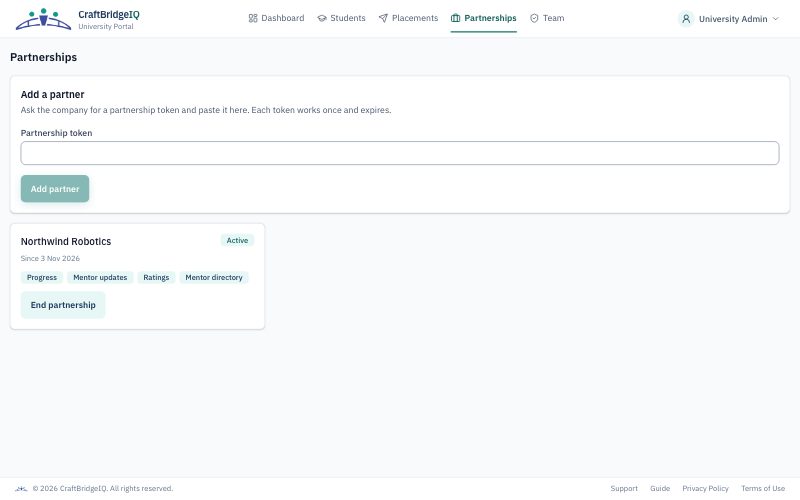
| No. | Control | What it does | What happens next |
|---|---|---|---|
| 1 | Partnerships | The page heading. | Nothing; it is a label. |
| 2 | Add a partner | The heading of the card where you paste a token. Under it a line explains that each token works once and expires. | Nothing; it is a label. |
| 3 | Partnership token | Where you paste the token the company gave you. | Enables the Add partner button. |
| 4 | Add partner | Uses the token. It is greyed out until you have typed or pasted something, and reads Adding... while it works. | The company appears in the list and a confirmation is shown. |
| 5 | Northwind Robotics | The company's name, one card per partnership. | Nothing; it is a label. |
| 6 | Active | The status of the partnership: Active, or Ended once either side has ended it. | Nothing; it is a label. |
| 7 | Since | The date the partnership started. An ended partnership adds the end date. | Nothing; it is a label. |
| 8 | Shared with you | Badges for what this company shares with you: Progress, Mentor updates, Ratings and Mentor directory. The company chooses these when it creates the token. | Nothing; they are labels. |
| 9 | End partnership | Ends the partnership. Shown only on an Active partnership. | A confirmation box asks you to confirm. |
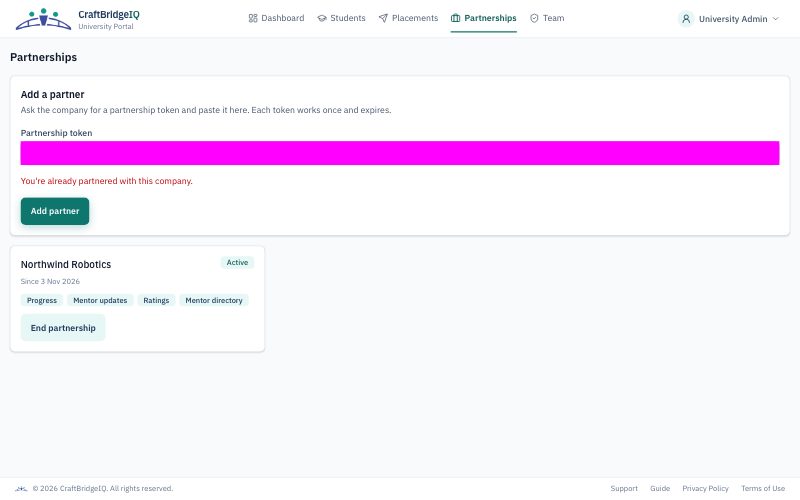
If you paste a token for a company you already partner with, the form says so:
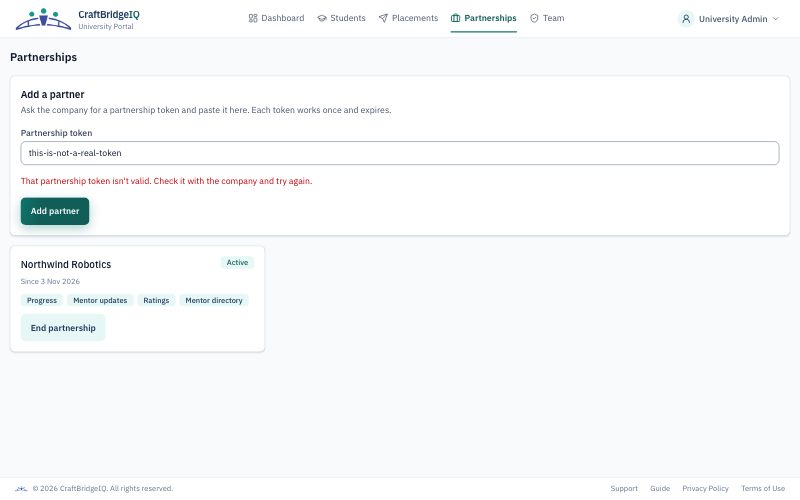
A token that does not exist gets its own message:
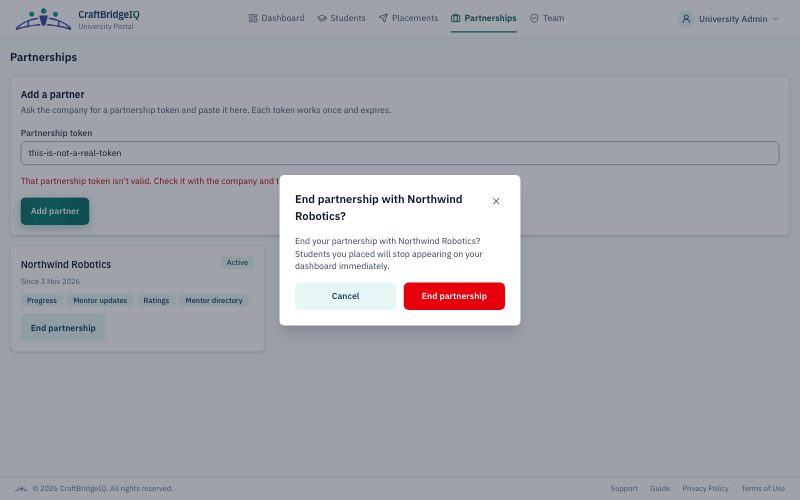
The confirmation box that opens when you press End partnership:
| No. | Control | What it does | What happens next |
|---|---|---|---|
| End partnership with Northwind Robotics? | The title of the box. It names the company. | Nothing until you choose a button. | |
| Cancel | Closes the box and changes nothing. | You are back on the Partnerships page. | |
| End partnership | Confirms. The button reads Ending... while it works. | The partnership is ended and the card changes to Ended. |
Step by step
Add a partner
- Ask the company’s administrator for a partnership token.
- Open Partnerships in the top menu.
- Paste the token into Partnership token.
- Press Add partner.
The token is cleared, a confirmation says you are now partnered with the company, and its card appears in the list and on the Dashboard.
See what a company shares
- Open Partnerships.
- Find the company’s card.
- Read the badges. Each badge is something this company shares with you.
- Progress: how far each placed student has got through the program.
- Mentor updates: the latest note from the student’s mentor.
- Ratings: the average rating mentors give the student, once enough ratings exist.
- Mentor directory: the company may share mentor names with you for context; you do not pick a mentor when requesting a placement.
What a student shares with you also depends on the student agreeing. See The dashboard.
End a partnership
- Find the company’s card.
- Press End partnership.
- Read the confirmation and press End partnership again.
The card stays in the list with the status Ended and a line saying who ended it. Students you placed with that company stop appearing on your Dashboard straight away, and you can no longer request placements with it.
The Add a partner form
| Field | Required | Rules | Example |
|---|---|---|---|
| Partnership token | Yes | Up to 128 characters. Spaces before and after are ignored. Each token works once and expires. | Paste it exactly as the company sent it |
Messages you can see
| Message | When you see it | What to do |
|---|---|---|
| You're now partnered with Northwind Robotics | After Add partner works. | Nothing. The company's card is in the list. |
| That partnership token isn't valid. Check it with the company and try again. | Under the form when the token does not exist. | Check that you pasted the whole token, or ask the company to confirm it. |
| That token was already used. Ask the company for a new one. | Under the form when someone has already used the token. | Ask the company for a new token. |
| That token has expired. Ask the company for a new one. | Under the form when the token is past its expiry. | Ask the company for a new token. |
| You're already partnered with this company. | Under the form when you already have an active partnership with that company. | Nothing. Find the company in the list. |
| Couldn't add that partner. Try again. | Any other failure without a reason from the server. | Try again; if it repeats, tell your CraftBridge contact. |
| Partnership with Northwind Robotics ended | After you confirm End partnership. | Nothing. |
| Couldn't end that partnership | A failure when ending a partnership. The text continues with a short request to try again. | Try again. |
| No partners yet | In place of the list when you have no partners. | Add a partner above using the token a company gave you. |
| Couldn't load your partners. | The list could not load. | Press the retry button shown with it. |
| Ended by the company | On an Ended card when the company ended the partnership. | Nothing. |
| Ended by your university | On an Ended card when you ended the partnership. | Nothing. |
Limits and other roles
- A token works once. The company decides how long it lasts, up to 30 days, and what it shares.
- You cannot change what a company shares from this page. Ask the company for a new token if you need a different set.
Common questions
Where does the token come from?
From the company. A company administrator creates it in Program Studio and sends it to you. CraftBridge does not send it to you. The company’s side is described in Partnerships.
Why can I not pick a company when I request a placement?
Only companies with an Active partnership are offered. If a partnership has ended, a new token from that company is needed. See Placements.
Does ending a partnership delete anything?
The partnership stays in the list as Ended, and your placement requests stay on the Placements page. Students you placed stop appearing on the Dashboard.
Last checked 2026-11-03 against the product.