
Placements
Offer a student a placement with a partner company.
What this page is for
A placement request asks a partner company to host one of your students. Use Placements to ask, to follow the company’s answer, and to take a request back while the company has not finished with it. The company decides; this page only asks.
- Where
- Placements, in the top menu (address /placements)
- Who can open it
- University administrators can request and withdraw. A support login can see the list and use the filter.
- App
- University Portal
How a placement request works
The same steps as a list
- Press Request a placement and choose a company and student
- Shows the request as Requested
- The company decides (Accepts: The company accepts and the student joins; Declines: The request shows Declined, with the reason)
- The company accepts and the student joins
- The request shows Enrolled
- The request shows Declined, with the reason
The screen
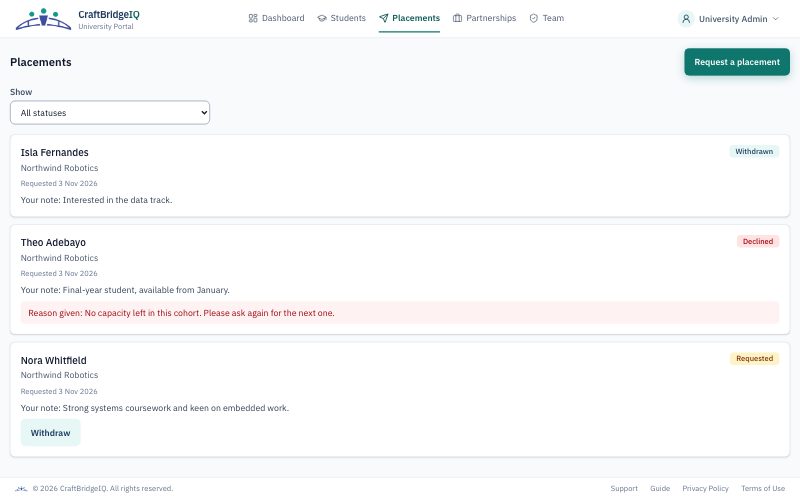
| No. | Control | What it does | What happens next |
|---|---|---|---|
| 1 | Placements | The page heading. | Nothing; it is a label. |
| 2 | Request a placement | Opens the form for a new request. | A box opens over the page. |
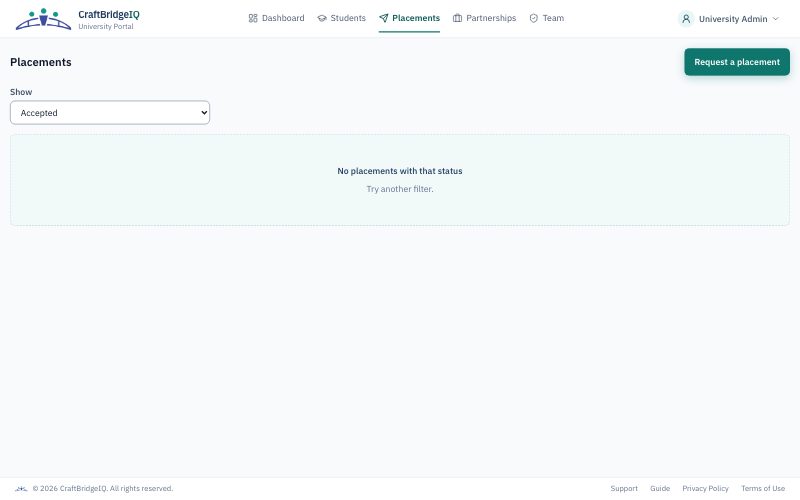
| 3 | Show | Filters the list by status. The choices are All statuses, Requested, Accepted, Enrolled, Declined and Withdrawn. | The list shows only requests with that status. |
| 4 | Nora Whitfield | The student's name. The company's name is on the line below it, and under that the date you made the request. | Nothing; it is a label. |
| 5 | Requested | The status of the request: Requested, Accepted, Enrolled, Declined or Withdrawn. | Nothing; it is a label. |
| 6 | Your note: | The message you sent with the request. Left out when you wrote none. | Nothing; it is a label. |
| 7 | Withdraw | Takes the request back. Shown only while the status is Requested or Accepted. | A confirmation box asks you to confirm. |
| 8 | Reason given: | Why the company said no. Shown on a Declined request when the company wrote a reason. | Nothing; it is a label. |
What the statuses mean
- Requested: the company has not answered yet.
- Accepted: the company has said yes. The student has not joined yet.
- Enrolled: the student has joined the company’s program.
- Declined: the company said no. The reason, if it gave one, is on the card.
- Withdrawn: you took the request back.
The student’s side of this is described in Accepting a placement.
The Request a placement box
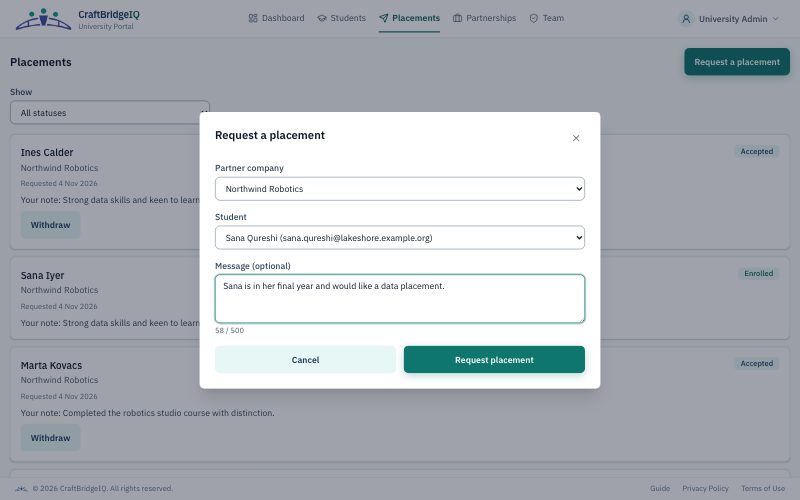
| No. | Control | What it does | What happens next |
|---|---|---|---|
| 1 | Partner company | Which company to ask. Only companies you have an active partnership with are listed. | Nothing else changes. |
| 2 | Student | Which student to ask for. The list shows each student's name and email. | Nothing else changes. |
| 3 | Message (optional) | A note to the company. | Shown on the card as Your note. |
| 4 | 58 / 500 | A counter of how many of the 500 characters you have used. | Nothing; it is a label. |
| 5 | Cancel | Closes the box without sending. | You are back on the Placements page. |
| 6 | Request placement | Sends the request. It reads Sending... while it works. | The box closes and the request appears as Requested. |
If the request is refused, the reason appears in the box above the buttons and nothing is sent:
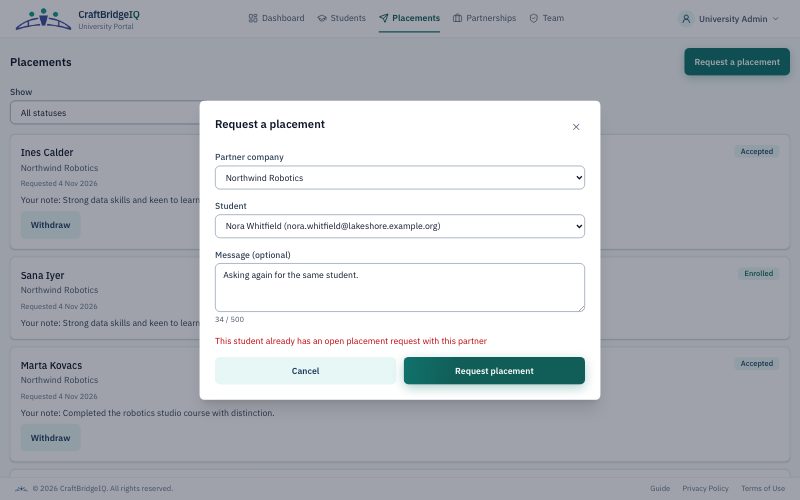
The Withdraw box and the filter
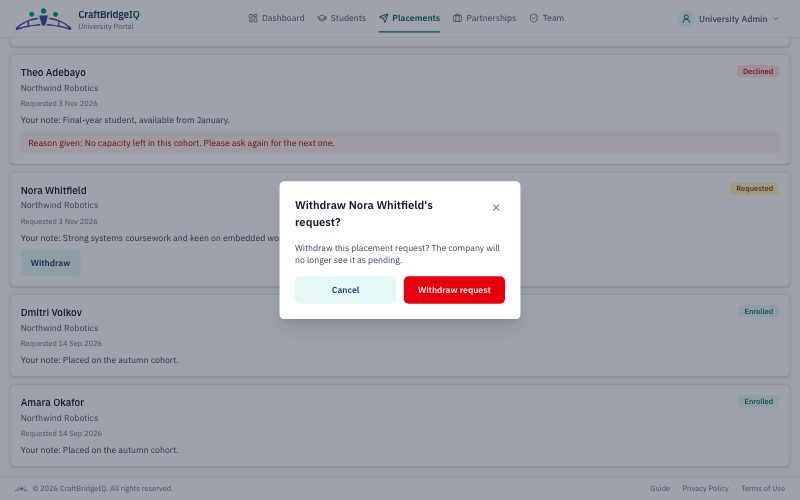
| No. | Control | What it does | What happens next |
|---|---|---|---|
| Withdraw Nora Whitfield's request? | The title of the box. It names the student. | Nothing until you choose a button. | |
| Cancel | Closes the box and changes nothing. | You are back on the Placements page. | |
| Withdraw request | Confirms. The button reads Withdrawing... while it works. | The request shows Withdrawn. |
Step by step
Request a placement
- Check the student is on your Students list and you have a partner on Partnerships.
- Open Placements and press Request a placement.
- Choose the company in Partner company.
- Choose the student in Student.
- Write a note in Message (optional) if you want to.
- Press Request placement.
The request appears at the top of the list as Requested.
Withdraw a request
- Find the request. It must show Requested or Accepted.
- Press Withdraw.
- Read the confirmation and press Withdraw request.
Find requests with one status
- Open the Show list.
- Choose a status, for example Declined.
- Choose All statuses to see everything again.
Read why a company said no
- Choose Declined in Show.
- Read the line that starts Reason given on the card.
If the company wrote no reason, the card shows only the Declined status.
The Request a placement form
| Field | Required | Rules | Example |
|---|---|---|---|
| Partner company | Yes | Choose one of your active partners. A partnership that has ended is not offered. | Northwind Robotics |
| Student | Yes | Choose one student from your list. | Sana Qureshi (sana.qureshi@lakeshore.example.org) |
| Message (optional) | No | Up to 500 characters. Blank messages are not sent. | Sana is in her final year and would like a data placement. |
Messages you can see
Requesting
| Message | When you see it | What to do |
|---|---|---|
| Placement requested for Sana Qureshi | After Request placement works. | Nothing. |
| This student already has an open placement request with this partner | In the box when the student has a Requested or Accepted request with that company. | Choose another student, or wait for the company's answer. |
| This partnership has ended | In the box when the partnership ended after you opened the page. | Ask the company for a new partnership token. |
| That mentor is not available to choose under this partnership | In the box when the company no longer shares that mentor. | Choose No preference or another mentor. |
| Couldn't send that request | In the box for any other failure. The text continues with a short request to try again. | Try again. |
| You need an active partner first. | In the box when you have no active partnership. | Press Add a partner, which opens Partnerships. |
| You need at least one student. | In the box when your student list is empty. | Press Add a student, which opens Students. |
| Couldn't load your partners and students. Close this and try again. | In the box when the partners or students could not load. | Close the box and open it again. |
The list, withdrawing and the filter
| Message | When you see it | What to do |
|---|---|---|
| Request for Nora Whitfield withdrawn | After you confirm Withdraw request. | Nothing. |
| Couldn't withdraw that request. | A failure when withdrawing, if the server gives no reason. | Try again. |
| A declined placement cannot be withdrawn | The company decided before you confirmed. The text names the status the request has now. | Nothing. The list now shows the company's answer. |
| No placement requests yet | In place of the list when you have made no requests. | Request a placement to ask a partner company to host one of your students. |
| No placements with that status | The Show filter matches nothing. | Try another filter. |
| Couldn't load your placements. | The list could not load. | Press the retry button shown with it. |
Limits and other roles
- A note can be up to 500 characters.
- A student can have one open request with a company at a time. After a request is declined or withdrawn you can ask again.
- Only an active partnership can take a request.
Common questions
Can I make the company accept?
No. The company keeps the decision, including how many places it has. You can withdraw a request but not change its answer.
Can I ask again after a decline?
Yes. A declined or withdrawn request no longer counts as open, so you can request a placement for the same student again.
Does the student have to agree?
Yes. Once the company accepts, the student joins through a link and chooses what to share with you. Until then nothing about them is shared. See The dashboard.
Why is there no Preferred mentor field?
The university does not choose a mentor when requesting a placement. The company assigns a mentor when it accepts the request.
Last checked 2026-11-03 against the product.