
The review queue
See the work waiting for your review, in order.
What this page is for
The review queue is the first page you see. It lists every piece of work your interns have submitted that is waiting for you, the work that has waited longest first. Each row has one default action: tap it to review.
- Where
- Review queue, the first link in the menu (address /). You land here after you sign in.
- Who can open it
- Mentors
- App
- Mentor Console
How the queue works
The same steps as a list
- An intern submits work
- Adds a row to your queue, late work first
- Tap a row to open the review
- Sign off, or log a check-in instead
- The row leaves the queue
The screen
The header and the footer are the same on every Mentor Console page, so they are described here once. On a phone the links sit behind the Menu button.
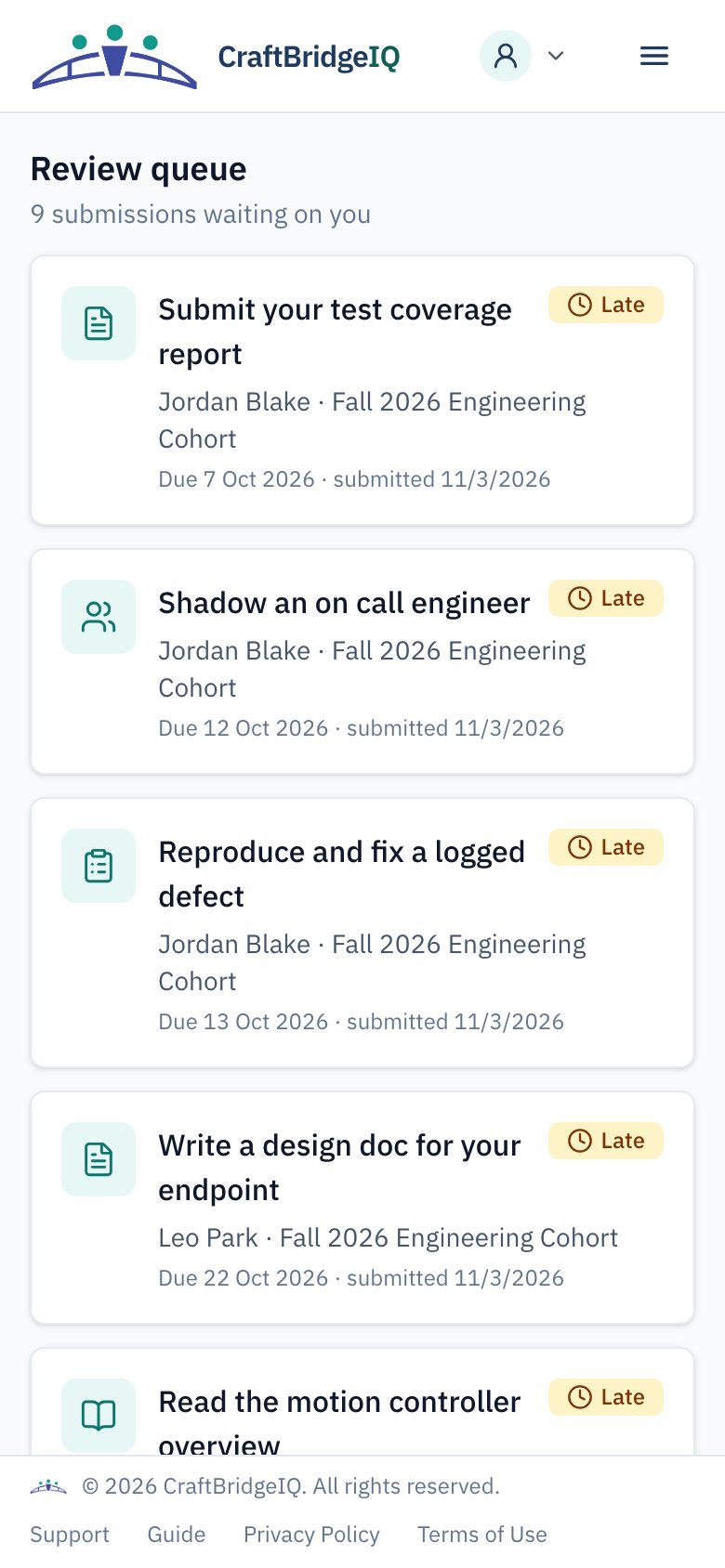
| No. | Control | What it does | What happens next |
|---|---|---|---|
| 1 | Menu | On a phone, opens the links to Review queue and My interns. On a wider screen the links sit in the header. | Tap a link to go to that page. |
| 2 | Account menu | Opens a small menu that shows your role and has three items: Profile, Help & guide and Log out. | Help & guide opens this guide in a new tab. Log out signs you out. See Logging out with sign-offs pending. |
| 3 | Review queue | The page heading. | Nothing; it is a heading. |
| 4 | 9 submissions waiting on you | How many submissions are in the queue. It reads 1 submission for one. | Nothing; it is a label. It is hidden when the queue is empty. |
| 5 | Submit your test coverage report | The title of the assignment. The icon beside it shows the type of activity. | Tap the row to open the review. |
| 6 | Late | A badge on work that was submitted after its due date. | Nothing; it is a label. Late rows are listed first. |
| 7 | Jordan Blake · Fall 2026 Engineering Cohort | The intern's name and their cohort. | Nothing; it is a label. |
| 8 | Due 7 Oct 2026 · submitted 11/3/2026 | The due date and the day the work was submitted. The submitted date uses your browser's date format. | Nothing; it is a label. |
| My interns | The link to the page with one card for each intern. | See My interns. |
When nothing is waiting, the queue says so.
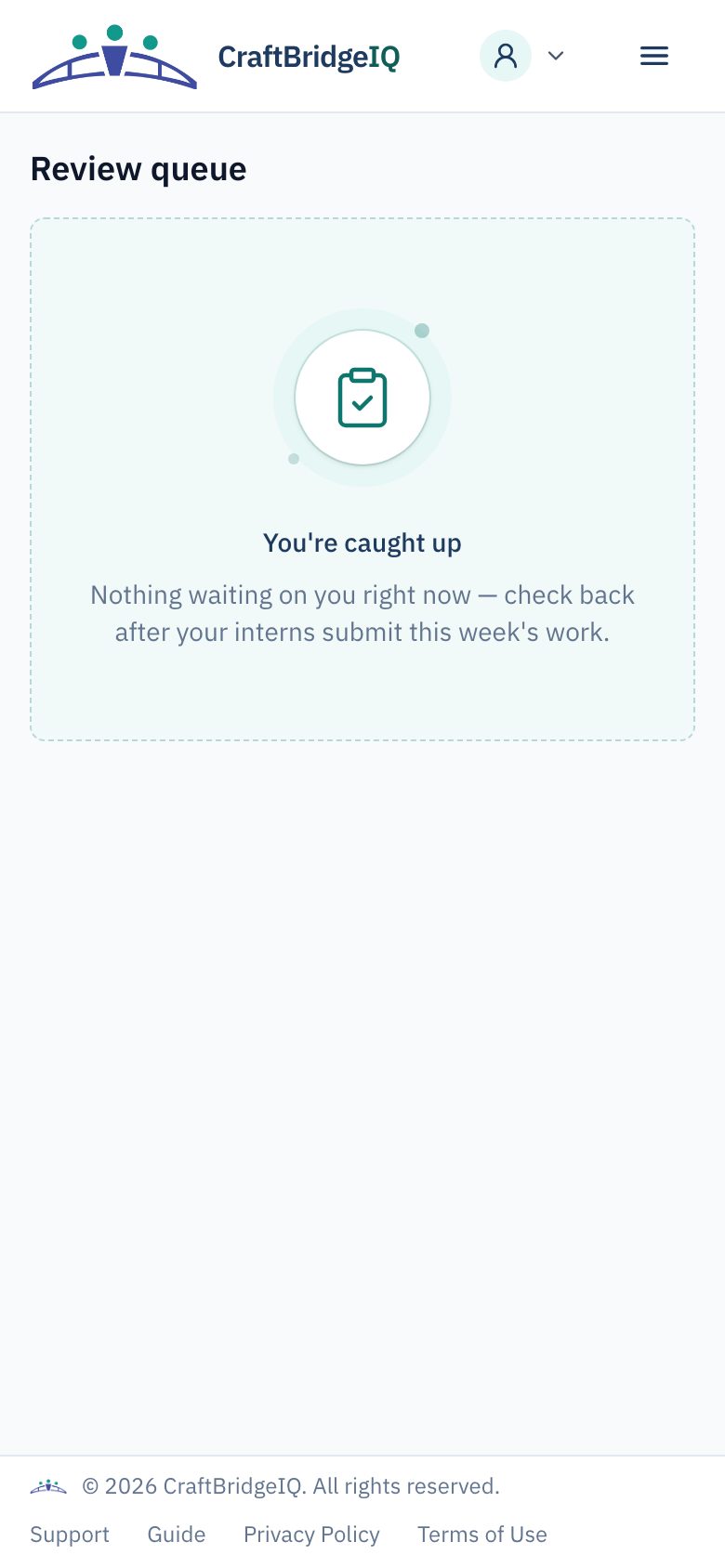
| No. | Control | What it does | What happens next |
|---|---|---|---|
| 9 | You're caught up | Replaces the list when nothing is waiting on you. | Check back after your interns submit this week's work. |
Step by step
Read your queue
- Open the Mentor Console. The review queue is the first page.
- Read the count under the heading.
- Start at the top. Late work comes first, the oldest due date first, then the work due soonest.
Review one submission
- Tap a row.
- Read the work in the sheet that opens, then sign it off or log a check-in. See Reviewing and signing off work.
Messages you can see
| Message | When you see it | What to do |
|---|---|---|
| You're caught up | Instead of the list, when nothing is waiting. | Nothing. |
| Nothing waiting on you right now | Under You're caught up. It continues: check back after your interns submit this week's work. | Check back later. |
| Couldn't load your queue. | The queue could not be loaded. A Try again button is shown with it. | Press Try again. |
Limits and other roles
- The queue holds work your interns have submitted and you have not signed off.
- Only interns you mentor appear. Work from other mentors' interns never shows here.
Common questions
In what order are the rows?
Late work first, the oldest due date first. Work that is not late follows, the soonest due first.
Why is a row I expected not here?
The row appears only after the intern has submitted. A row you signed off is gone, and so is a row whose sign-off is waiting to be saved.
What does Late mean?
The intern submitted after the due date, which is worked out in the program’s own time zone.
Last checked 2026-11-03 against the product.