
Competencies
The skills your templates teach and sign off.
What this page is for
A competency is a skill an intern can show, for example Written communication or Debugging and root cause analysis. Competencies are grouped into frameworks. You tag competencies on the activities of a template, and the version editor shows how many activities teach each one.
This page lists your frameworks and lets you create a framework and add or remove competencies.
- Where
- Curriculum menu, then Competencies (address /competencies)
- Who can open it
- Administrators can add and remove. View-only support logins can look but not change.
- App
- Program Studio
How competencies get used
The same steps as a list
- Add the competency to a framework here
- Tag it on an activity in the version editor
- The version's coverage counts the tag
- The competency is now in use and cannot be removed
The screen
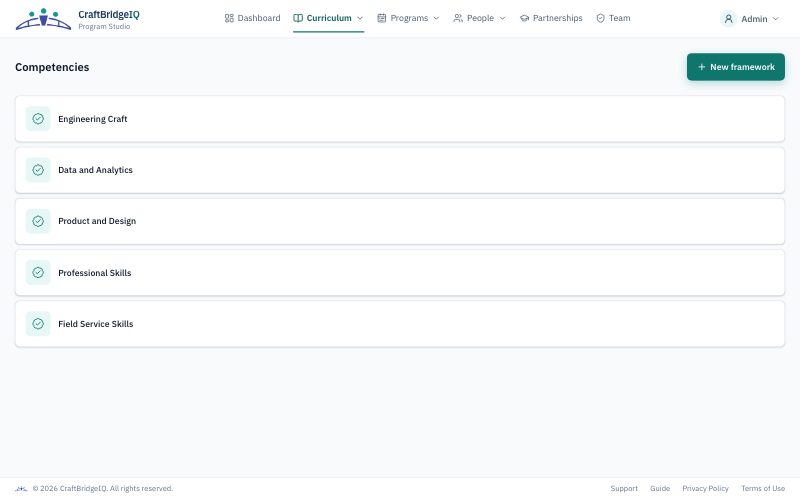
| No. | Control | What it does | What happens next |
|---|---|---|---|
| 1 | Competencies | The page heading. | Nothing; it is a label. |
| 2 | New framework | Opens a box to create a framework. Not shown to support logins. | The New framework box opens. |
| 3 | Engineering Craft | One card per framework, with its name and, if it has one, its description. | Opens the card to show its competencies. Press it again to close it. |
| System | A badge on a framework that comes with CraftBridgeIQ rather than from your company. Its competencies cannot be removed. | Nothing; it is a label. |
An open framework:
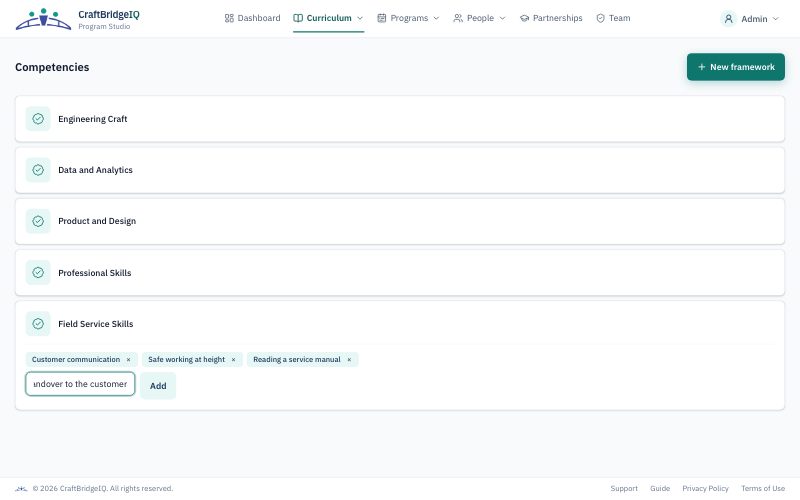
| No. | Control | What it does | What happens next |
|---|---|---|---|
| 1 | Field Service Skills | The header of the open framework. Pressing it closes the card. | The competencies are hidden. |
| 2 | Customer communication | One chip per competency. A competency from a CraftBridgeIQ framework is a plain badge with no cross. | Nothing; it is a label. |
| 3 | Remove Reading a service manual | The cross on a chip. It is named Remove followed by the competency. | The competency is removed at once, with no confirmation, unless it is in use. |
| 4 | New competency name | A box for a new competency. Its hint reads Add a competency… | Press Add or Enter to save it. |
| 5 | Add | Adds the competency to the open framework. | It appears as a chip and the box clears. |
The box that opens when you press New framework:
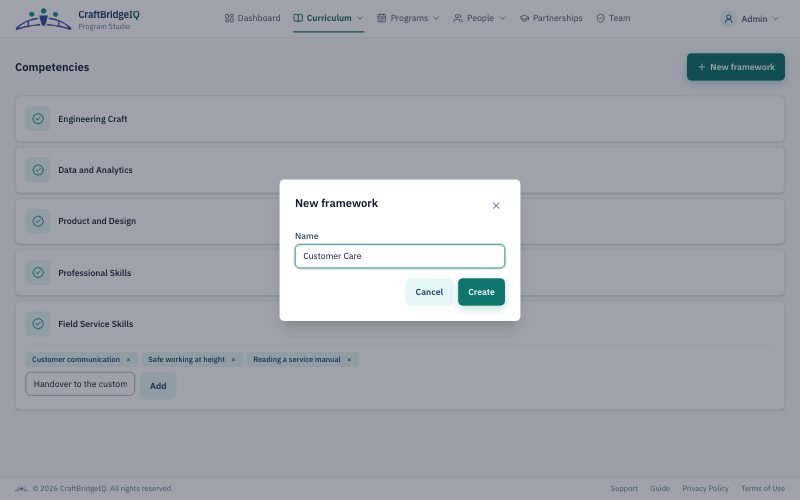
| No. | Control | What it does | What happens next |
|---|---|---|---|
| 1 | New framework | The title of the box. | Nothing; it is a label. |
| 2 | Name | The framework's name. | Shown on its card. |
| 3 | Cancel | Closes the box and changes nothing. | You are back on the list. |
| 4 | Create | Creates the framework. It stays greyed out until the name has text. It reads Creating… while it works. | A confirmation appears and the new framework opens. |
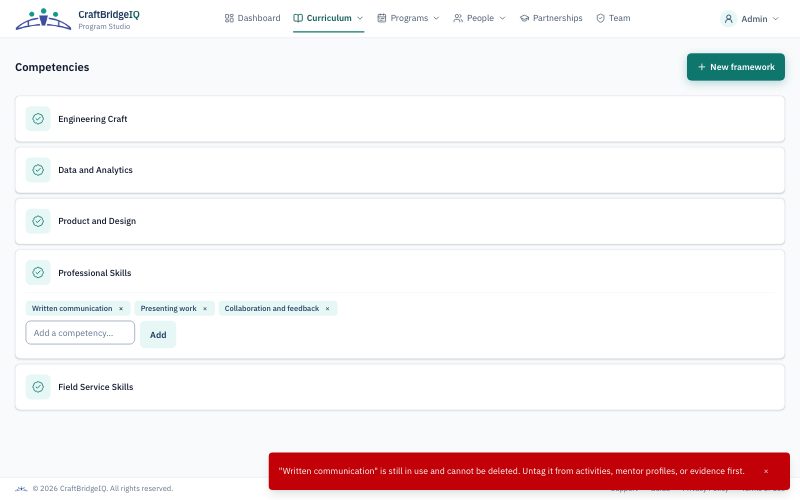
When you remove a competency that activities still use, the server refuses and nothing changes:
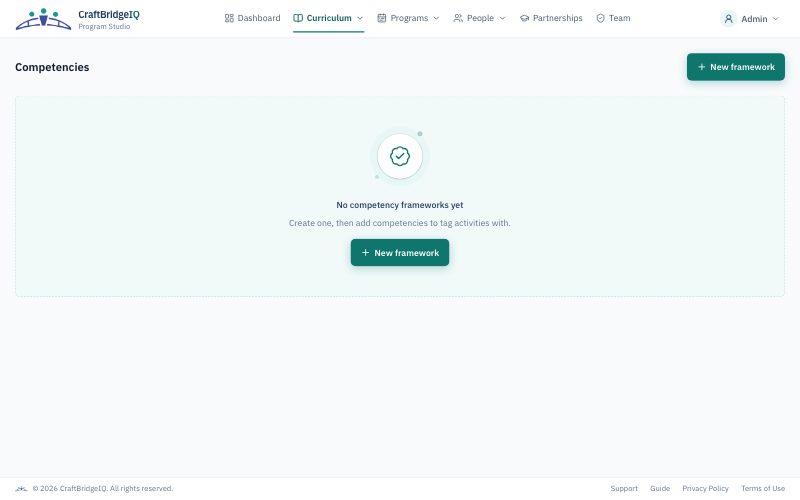
With no frameworks at all:
Step by step
Create a framework
- Open the Curriculum menu and choose Competencies.
- Press New framework.
- Type a name.
- Press Create.
The new framework opens, empty, so you can add competencies straight away.
Add a competency
- Press the framework’s card to open it.
- Type the competency in the box that reads Add a competency…
- Press Add.
The competency can now be tagged on activities. See Editing a version.
Remove a competency
- Open the framework.
- Press the cross on the competency’s chip.
It disappears and Competency removed appears. If the competency is tagged on an activity, on a mentor’s profile or on a piece of evidence, the server refuses and tells you to untag it first.
The forms
| Field | Required | Rules | Example |
|---|---|---|---|
| Name | Yes | Up to 200 characters. A blank name cannot be created. | Customer Care |
| New competency name | Yes | Up to 200 characters. Add does nothing while it is blank. | Handover to the customer |
Messages you can see
| Message | When you see it | What to do |
|---|---|---|
| Framework created | After Create works. | Nothing. The new framework opens. |
| Competency removed | After a competency is removed. | Nothing. |
| "Written communication" is still in use and cannot be deleted. Untag it from activities, mentor profiles, or evidence first. | You remove a competency that is tagged somewhere. The name of the competency is filled in. | Untag it first: remove its tag from every activity (in a draft version), mentor profile and piece of evidence. |
| Couldn't create the framework. | Create failed and the server gave no more specific reason. A more specific server message is shown in its place when there is one. | Try again. |
| Couldn't add that competency. | Add failed. | Try again. |
| Couldn't remove that competency. | Removing failed and the server gave no more specific reason. | Try again. |
| Couldn't load competency frameworks. | The list could not load. | Press Try again beside it. |
| Couldn't load competencies. | An open framework's competencies could not load. | Press Try again beside it. |
| No competencies yet. | An open framework has no competencies. | Add one with the box below, or ask your administrator. |
| No competency frameworks yet | You have no frameworks. | Press New framework. |
| Create one, then add competencies to tag activities with. | Under No competency frameworks yet, for administrators. | Press New framework. |
| None have been created yet. | Under No competency frameworks yet, for support logins. | Ask your administrator. |
| This account can view but not change data. | A support login's change was refused by the server. | Ask your administrator. |
Limits and other roles
- Framework and competency names can be up to 200 characters.
- The page has no way to rename a competency, edit a description or delete a framework.
- A competency that is in use cannot be removed.
Common questions
Why can't I remove a competency?
It is tagged on an activity, a mentor’s profile or a piece of evidence. Removing it would break that record, so the server refuses. Untag it first. Tags on a published version cannot be changed, so a competency used there stays.
Why does a competency have no cross?
It belongs to a framework that comes with CraftBridgeIQ (marked System), or you are signed in as a support login. Those show as plain badges.
Do all competencies need an activity?
No. The publish check lists the competencies that no activity in a version teaches, but it does not stop you. See Publishing a version.
Last checked 2026-11-03 against the product.