
One intern's weeks
One intern's page: what needs you, their weeks, marks, check-ins, and opening a week early.
What this page is for
Everything about one intern on one page. At the top, Needs you lists their work waiting for your review and when you last checked in. Below come every week of their program, open or locked, with each activity’s state, the mark you gave and the reason when you sent it back; the competencies they have shown; and their recent check-ins. Locked weeks carry the buttons that open them early.
- Where
- Tap an intern's name on My interns (address /interns/ followed by the intern's code)
- Who can open it
- The mentor of that intern
- App
- Mentor Console
How opening weeks early works
The same steps as a list
- Open the intern's page from My interns
- Find the last week you want open
- Press Unlock through Week N
- Check the names and press Open Week N
- Opens every week up to N for that intern
The screen
The header and footer are the same on every Mentor Console page. See the review queue page.
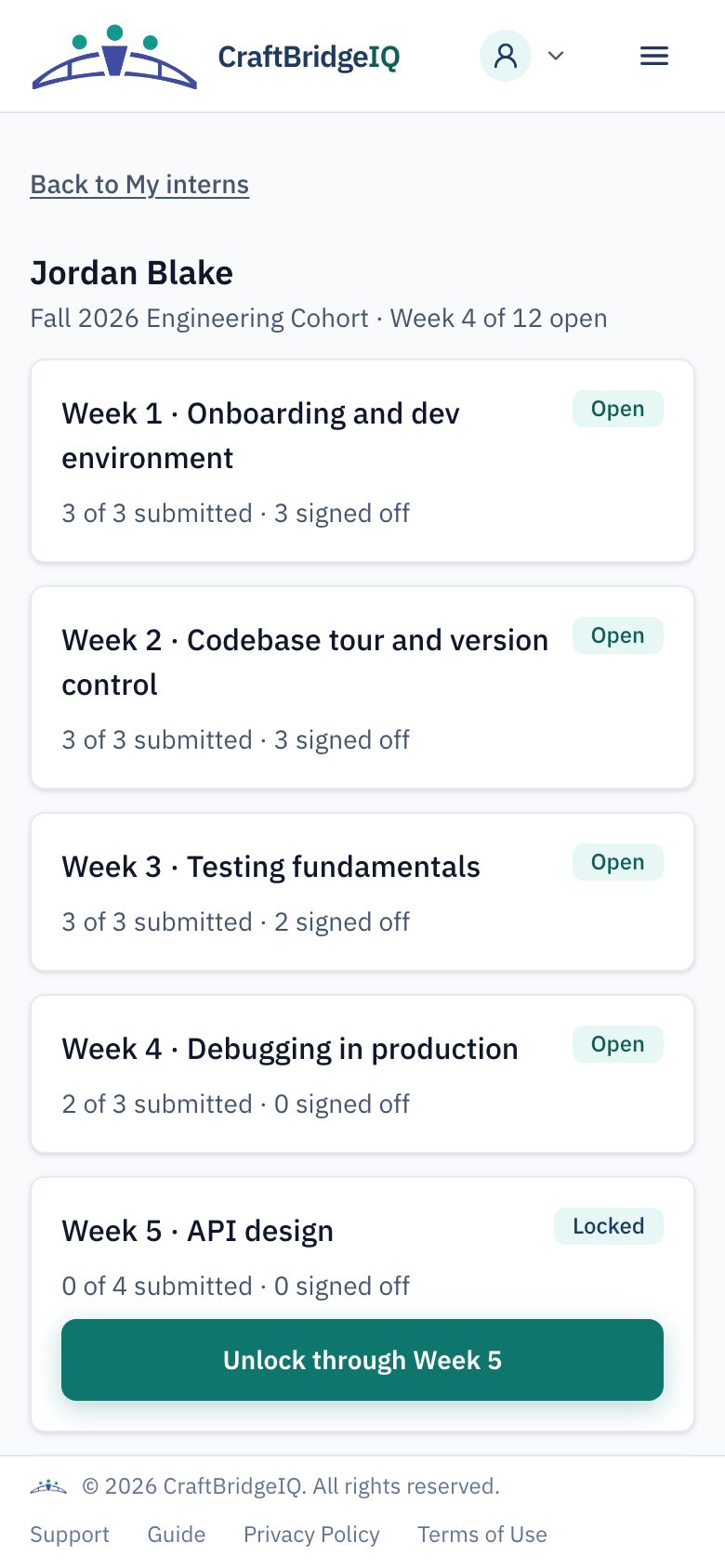
| No. | Control | What it does | What happens next |
|---|---|---|---|
| 1 | Back to My interns | A link to the list of all your interns. | You are back on My interns. |
| 2 | Jordan Blake | The intern's name, as the heading. | Nothing; it is a heading. |
| 3 | Fall 2026 Engineering Cohort · Week 4 of 12 open | The cohort, and how many weeks are open out of all the weeks. | Nothing; it is a label. |
| 4 | Week 1 · Onboarding and dev environment | One card for each week, with its number and the title the program gave it. | Nothing; it is a label. |
| 5 | Open | The state of the week. It reads Open when the intern can work on it, Open (you opened it) when you opened it early, or Locked. | Nothing; it is a label. |
| 6 | 3 of 3 submitted · 3 signed off | How many of the week's assignments the intern has submitted and how many you have signed off. A week with no assignments reads No assignments. | Nothing; it is a label. |
The page now also has these parts (the figures above were taken before they were added).
| No. | Control | What it does | What happens next |
|---|---|---|---|
| Needs you | Work waiting for your review, one row each, and when you last checked in. | Tap a row to review it. | |
| Review | The badge on a row in Needs you. | Tap the row to open the review sheet. | |
| Log a check-in | Opens the check-in form for this intern. It is the bright button when no check-in was logged in the last two weeks. | See Reviewing and signing off work. | |
| No check-in logged yet | Shown in Needs you before your first check-in. Afterwards it reads Last check-in today, yesterday, or a number of days ago. | Press Log a check-in. | |
| Waiting for you | An activity the intern submitted that you have not reviewed. | Review it from Needs you. | |
| Sent back | An activity you sent back. The reason you gave shows under it, after You asked. | It returns to your queue when the intern resubmits. | |
| Proficient | The mark you gave, beside a signed-off activity. It can also read Developing or Exceeds. | Nothing; it is a label. | |
| Competencies shown | Each competency of the program, with how much evidence the intern has, or Not shown yet. | Nothing; it is a list. | |
| Recent check-ins | Your last three check-ins with the mood, the rating and your notes. | Nothing; it is a list. |
Locked weeks carry a button to open them.
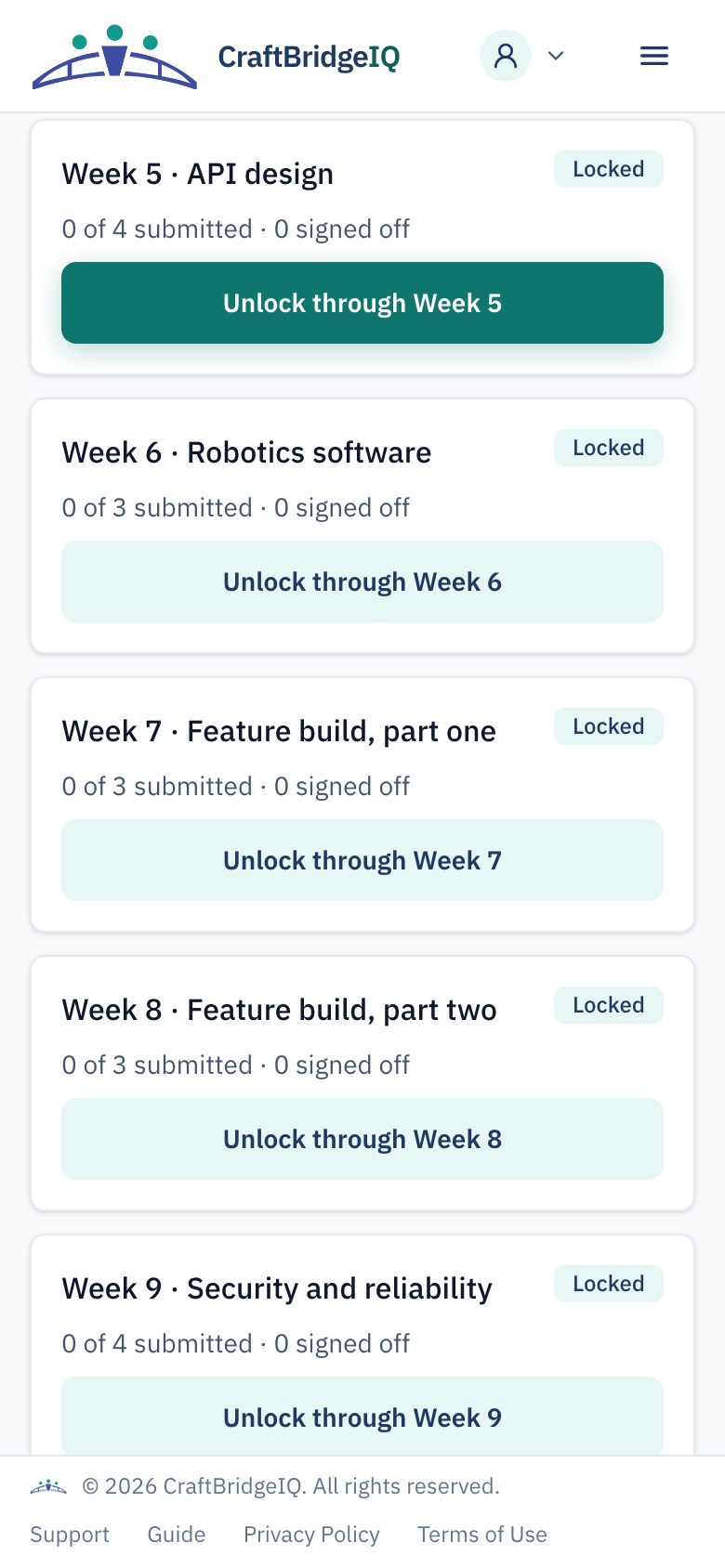
| No. | Control | What it does | What happens next |
|---|---|---|---|
| 7 | Locked | The badge of a week the intern cannot work on yet. | Use the button below it to open it. |
| 8 | Unlock through Week 5 | The bright button on the soonest locked week. It opens that week. | A sheet asks you to confirm. |
| 9 | Unlock through Week 6 | A lighter button on each later locked week. It opens every week from the first locked one up to this one. | A sheet asks you to confirm. |
A button for a later week opens a range of weeks, and the sheet names the range.
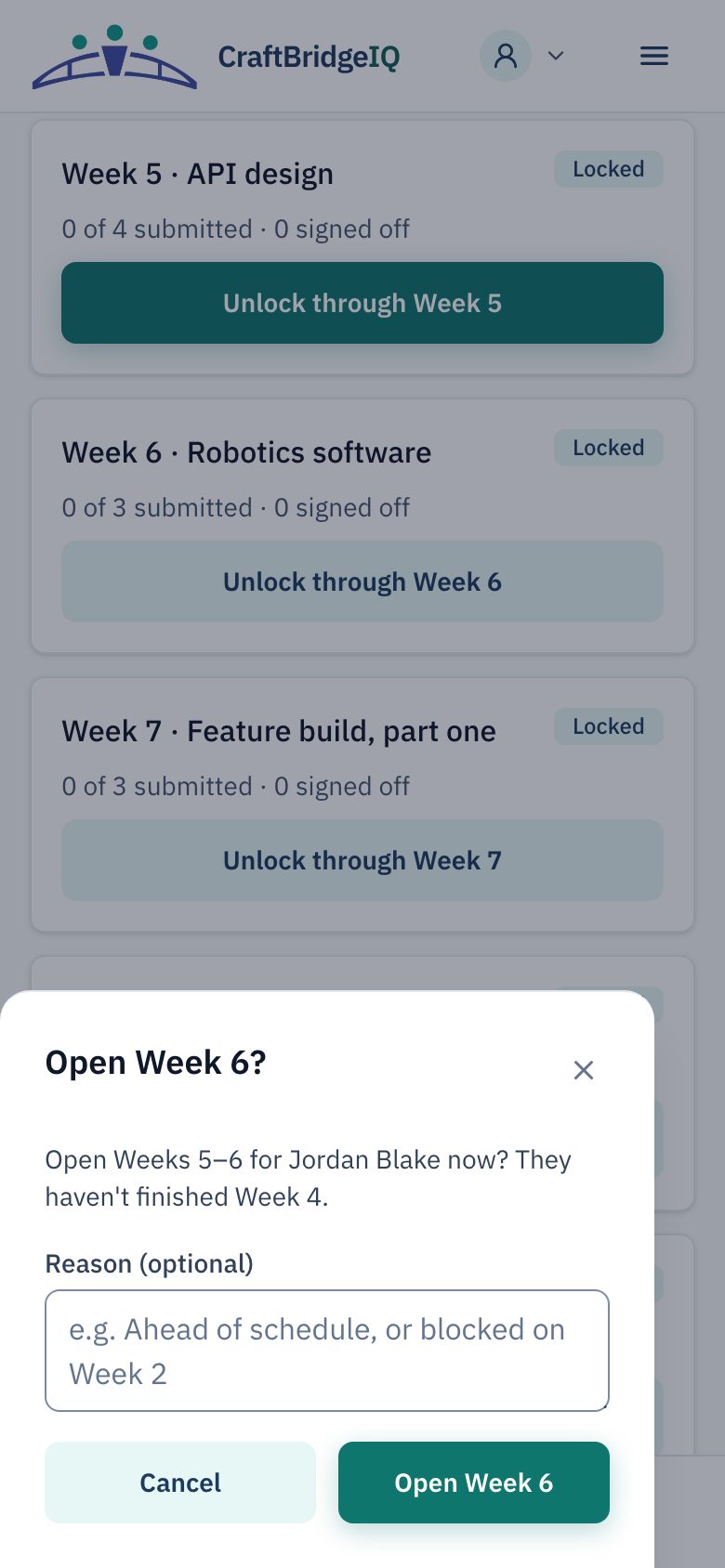
| No. | Control | What it does | What happens next |
|---|---|---|---|
| 10 | Open Week 6? | The title of the sheet. It names the last week that will open. | Nothing; it is a heading. |
| 11 | Open Weeks 5–6 for Jordan Blake now? They haven't finished Week 4. | Says which weeks open and for whom, and names the last week that is open now, which the intern has not finished. | Read it before you confirm. The sheet also has a Reason (optional) box and a Cancel button. |
| 12 | Open Week 6 | Opens the weeks. It reads Opening… while it works. | A message confirms and the page updates. |
Step by step
See an intern's weeks
- Open My interns and tap the intern’s name.
- Read the cards from the top. Open weeks come first, then the locked ones.
- Press Back to My interns when you are done.
Open weeks early
- Find the last week you want the intern to be able to work on.
- Press its Unlock through Week button.
- Check the intern’s name and the weeks in the sheet. Add a Reason (optional) if you like.
- Press Open Week.
A message says the week is open for the intern. The cards update, and the intern sees the assignments on Your week.
Messages you can see
| Message | When you see it | What to do |
|---|---|---|
| Week 6 is open for Jordan Blake | A toast after Open Week works. | Nothing. |
| Couldn't open that week | A toast, when opening failed. It ends with: try again. The page refreshes to show the real state. | Check the cards, then try again. |
| No weeks yet | Instead of the cards, when the program has no weeks. | Ask your program admin. |
| This program has no weeks to show. | Under No weeks yet. | Nothing. |
| Couldn't load this intern's weeks. | The weeks could not be loaded. A Try again button is shown with it. | Press Try again. |
| No assignments | On a week with no assignments. | Nothing. |
| Open (you opened it) | The badge of a week you opened early. | Nothing. |
Limits and other roles
- The reason can be up to 500 characters.
- Weeks open in order: opening a later week opens every week before it too.
Common questions
Which button do I press to open just the next week?
The bright one, on the first locked week. The lighter buttons open that week and every locked week before it.
Why does the heading just say Intern?
The page could not find the intern in your list yet. The weeks below are still correct.
Can I close a week I opened?
Not from this page. Check the intern and the week in the sheet before you press Open Week.
Last checked 2026-11-03 against the product.